
Organizing Entities
The Hierarchy panel is where you browse, structure, and find everything in a space. It offers several ways to look at your entities, and the modes work together — so you can use whichever fits the task at hand.
The Hierarchy panel
Section titled “The Hierarchy panel”Open the panel from the left of the workspace. It has two tabs:
-
Hierarchy — every entity in the space (3D models, measures, Points of Interest, RealityAssets, and more).
-
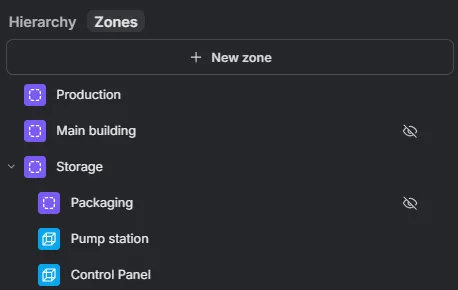
Zones — the same entities organized by the zones they physically fall within.
Saved and unsaved entities appear together in one list, with unsaved (local) entities marked by a chip. Selecting an entity in the scene scrolls the list to it.
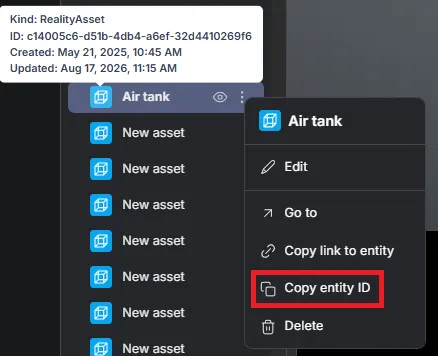
Every saved entity also carries an ID. Hovering an entity’s icon shows that ID along with its kind and timestamps, and the entity’s contextual menu offers Copy entity ID — handy for pointing at one specific object in a support ticket or an API call. An unsaved entity has no ID to copy yet.
Group by type and sort
Section titled “Group by type and sort”In the Hierarchy tab you can change how the list is organized:
-
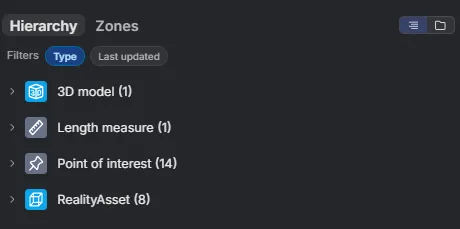
Group by type — the Type option groups entities by their kind (3D model, Length measure, Point of Interest, RealityAsset, …), with a count per group.
-
Sort — order entities by Name or by Last updated.
Folders
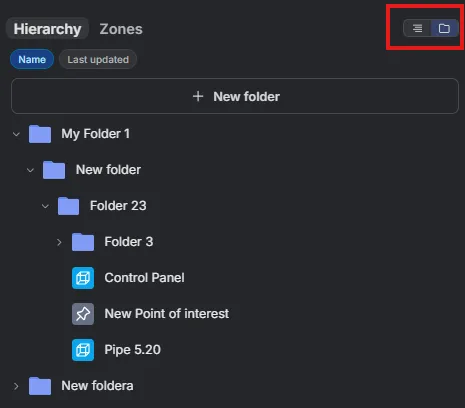
Section titled “Folders”Switch between a flat list and a folder structure using the toggle at the top right of the panel. In folder view, select + New folder and organize entities into a nestable folder hierarchy — group related items however makes sense for your workflow.
On the Zones tab, zones can be nested inside one another, and every entity that physically falls within a zone’s boundaries is grouped under it automatically — computed from its location, with no manual assignment. See Zones to create and edit them.
Showing and hiding entities
Section titled “Showing and hiding entities”Use the eye button on a row to toggle whether an entity is shown in the scene. This is available on all major entities.

Use the mode that fits
Section titled “Use the mode that fits”These views work together: group by type to audit what’s in a space, build folders for a curated structure, or switch to zones to work by physical area. Combine whichever modes suit the task at hand.